Best Standing Desk Accessories: Mats, Footrests and the Ones to Skip
Four accessories that change something measurable, ranked by how much they change per dollar. The keyboard tray matters more than the mat.
By Ellis Warner, editor, hardware and workstation geometry
Published Aug 21, 2026 · 9 min read
- Updated August 21, 2026
- 9 min read
In this guide
The accessories aisle for standing desks is mostly upsell. A handful of items change something you can point at, and the rest are cable clips with a brand on them.
Four below, ordered by how much they change per dollar. The most expensive one is also the one with the largest effect, which is unusual enough in this category to be worth stating up front.
Specifications below are from the published product listings.
The order things should be bought in
Before the products, the priority, because it decides which of these you need.
A standing desk that is at the wrong height is not improved by accessories. Measure your two elbow heights, set the presets and use them for a fortnight. Then buy whichever of these the fortnight told you that you needed, and probably not the others.
The genuine sequence is: correct heights, then a keyboard tray if the desk cannot come low enough, then a mat if standing is what hurts, then a footrest if sitting is, then cable management because a desk that goes up needs it.
VIVO Clamp-on Keyboard Tray

VIVO Clamp-on Keyboard Tray
The only accessory here that changes your working geometry rather than your comfort within it. A clamp-on tray drops the typing surface below the desktop, which is the fix for the large number of adults whose seated elbow height is below what any frame can reach with a top on.
We may earn a commission on this link. It never changes the ranking.
- Type
- Clamp-on under-desk keyboard tray
- Platform
- Wide enough for a full keyboard and mouse
- Mounting
- Clamps on, no drilling
- Adjustment
- Slides in and out on a track
- Best for
- A desk that cannot come low enough
What works
- Solves the too-tall-desk problem no height preset can fix
- Wide platform takes a full keyboard and a mouse, so the mouse comes off the desk
- Clamp mount means no drilling into the desktop
- Slides away under the desk when you are not typing
What to know
- Needs clearance under the desk, which not every desk has
- Adds a step to raising and lowering if the tray fouls anything
- A clamp needs a suitable desk edge to grip
- Heavier setups test any tray's mechanism over time
Wrong for you if your desk already reaches your seated elbow height. This is a fix for a specific measured problem, and the arithmetic tells you whether you have it.
Mind Reader Adjustable Foot Rest
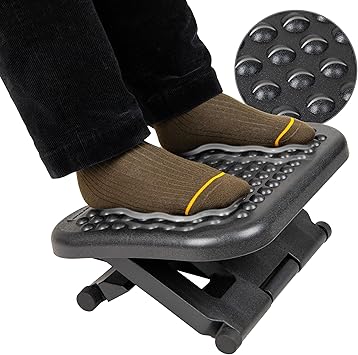
Mind Reader Adjustable Foot Rest
A height-adjustable footrest, which is the point: your gap is a specific number of inches and an adjustable platform meets it rather than matching it by luck. Buy it only if the thirty-second test says you need one, because a footrest under feet that already reach the floor raises your knees above your hips and tips the pelvis the wrong way.
We may earn a commission on this link. It never changes the ranking.
- Type
- Height-adjustable footrest
- Adjustment
- Multiple height settings
- Use
- Seated foot support at a too-tall desk
- Best paired with
- A chair raised to meet a desk that cannot come down
- Alternative
- A stack of books, if your gap happens to match
What works
- Height adjusts to your specific gap rather than a fixed block
- Fixes the pelvic-tilt half of the too-tall-desk problem
- A defined platform keeps both feet supported side by side
- Cheaper than the tray, and for some people the more relevant of the two
What to know
- Actively harmful if your feet already reach the floor, because it raises the knees above the hips
- Does nothing for the shoulder half of a too-tall desk, only the tray addresses that
- One more object in the footwell
- Books at zero cost work if your gap is fixed and they do not slide
Wrong for you if your feet are already flat with your thighs level. The thirty-second test has a yes or no answer and it is worth doing before ordering.
Amazon Basics Anti-Fatigue Standing Mat

Amazon Basics Anti-Fatigue Standing Mat
A cushioned anti-fatigue mat, the cheapest item here and the one most likely to determine whether you keep using the desk at all. In one eight-week sit-stand workstation trial, 33% of participants reported more back pain on the days they used the workstation, and a hard floor under bare feet is part of that.
We may earn a commission on this link. It never changes the ranking.
- Type
- Cushioned anti-fatigue standing mat
- Thickness
- 3/4 inch cushioned foam
- Use
- Under the standing position
- Note
- Raises your standing height by its own thickness, so re-check the preset
- Care
- Wipe clean
What works
- Cheap way to address the most common reason people abandon a standing desk
- Thick cushioned foam takes the edge off a hard floor
- No installation, works with any desk
- Cheap enough to buy alongside the desk rather than after giving up on it
What to know
- Any mat raises your standing height by its thickness, so reset the preset after it arrives
- Anti-fatigue mats are a comfort intervention, not something with trial evidence behind them
- Another object in the footwell that the chair catches on when you sit
- A flat rectangular mat, with no contoured stretch features
Wrong for you if you are standing on carpet already and comfortable. The mat solves a hard-floor problem.
Under-Desk Cable Management Tray

Under-Desk Cable Management Tray
No ergonomic claim, and the thing that stops a desk pulling a monitor cable taut at full extension. Included because a desk you stopped raising after it unplugged your dock twice is a desk that is not doing anything for you.
We may earn a commission on this link. It never changes the ranking.
- Type
- Under-desk cable management tray
- Mounting
- No-drill clamp or screw options
- Problem it solves
- Cables at the limit of their length at full extension
- Note
- Measure your travel and slack before buying anything
- Alternative
- Velcro ties and a power strip mounted to the underside of the desk
What works
- Cheap, and it removes a genuine reason people stop raising the desk
- No compatibility questions and nothing to adjust
- Prevents a dock or monitor cable being pulled out at full height
- A power strip on the frame plus this covers most desks
What to know
- No posture benefit whatsoever, and it does not pretend to have one
- Velcro ties from a hardware shop do most of the same job for less
- Only useful once you know where your cables are tight
- A desk with a long travel may need more than one
Wrong for you if your cables already have slack. Measure at full extension before ordering.
What to skip
Under-desk treadmills and bikes, unless you specifically want one. Nothing in the sit-stand literature supports them as a posture intervention. The SMArT Work trial found sitting time fell and standing rose with walking essentially unchanged, which tells you the desk is not a movement device. A treadmill is a fitness purchase and should be evaluated as one.
Balance boards. Marketed as active standing. There is no trial evidence that standing on an unstable surface improves any postural outcome, and there is a real trip hazard.
Branded cable clips at $2 each. Hardware shop, a bag of twenty, done.
A second monitor arm bought at the same time as the desk. Buy the desk, set the heights, live with it for a fortnight, then find out where the screen actually needs to be. The arm roundup is a separate purchase for a separate reason and there is no discount for confusion.
Which of the four
Your desk cannot come down to your seated elbow height: the keyboard tray. It is the only one that changes your geometry.
Your feet dangle when the chair is set to the desk: the footrest, after the thirty-second test.
Standing is what hurts: the mat, and reset your standing preset once it arrives.
Something has been unplugged by the desk: the cable tray.
None of the above applies: buy nothing. Spend the money on nothing at all, or on the fortnight of actually using the height presets that will tell you which of these you need.
Questions people actually ask
Do anti-fatigue mats actually work?
They are a comfort intervention rather than one with trial evidence behind it. What is documented is that a third of participants in one eight-week sit-stand workstation trial reported more back pain on workstation days, and a hard floor is a plausible part of that. At $29 the mat is worth trying before concluding standing does not suit you.
What standing desk accessory is worth buying first?
None of them, until you have used the desk at correctly measured heights for a fortnight. After that, the keyboard tray if your desk cannot reach your seated elbow height, because it is the only one that changes the geometry rather than your comfort within it.
Do I need a footrest with a standing desk?
Only if your feet do not reach the floor when the chair is set to the desk. If they do, adding a footrest raises your knees above your hips and tips the pelvis backward, which is the problem you were trying to avoid.
Are under-desk treadmills good for posture?
There is no evidence that they are. The main sit-stand trial found that sitting fell and standing rose while walking stayed essentially unchanged, so the desk itself does not make you move. A treadmill is a fitness purchase and should be judged as one rather than as a posture intervention.
Will a mat change my standing desk height setting?
Yes, by its own thickness. A three-quarter inch mat raises you three-quarters of an inch, which comes off your standing height requirement. Reset the preset once it arrives rather than assuming the old number still applies.
Sources
- Healy et al., "Evaluation of sit-stand workstations in an office setting: a randomised controlled trial", BMC Public Health, 2015, for the 33% reporting increased back pain. PMC4653846
- Edwardson et al., "Effectiveness of the Stand More AT (SMArT) Work intervention: cluster randomised controlled trial", BMJ, 2018, for the unchanged walking finding. PMC6174726
- Waters and Dick, "Evidence of Health Risks Associated with Prolonged Standing at Work and Intervention Effectiveness", Rehabilitation Nursing, 2015. PubMed 25041875
As an Amazon Associate we earn from qualifying purchases. We earn a commission on some links, at no extra cost to you. It never changes which products we recommend or how they score. Full disclosure

Who wrote this
Editor, hardware and workstation geometry
Ellis Warner edits A Better Posture and writes the hardware side of it: desks, chairs, monitor arms and the measurements that decide whether any of them help. He reads the specification sheet, the warranty and the returns policy in full before he reads a single review, because that is where the differences between two apparently identical products actually live.
More from EllisThe standard
How this guide was built
- Manufacturer specification sheets and warranty terms, read in full rather than summarised from a listing.
- Published clinical trials and standards bodies where they exist, cited by name and linked.
- Owner reports at volume, including the one-star reviews, which is where failure modes live.
- Every price checked against the live listing on the date printed beside it.