Best Standing Desks Under $500
Three desks that clear the price line and one that does not, compared on the specifications that decide stability, range and who each one actually fits.
By Ellis Warner, editor, hardware and workstation geometry
Published Jul 23, 2026 · 8 min read
- Updated July 23, 2026
- 8 min read
In this guide
Under $500 is the interesting tier in this category, because it is where manufacturers start making visible compromises and where the specification sheet stops being marketing and starts being a warning.
Below that line you will meet lighter weight ratings, two-stage frames with limited travel, and height ranges whose bottom end excludes a substantial number of adults. None of that makes a desk bad. It makes it specific, and the job of this page is to say who each one is specific to.
Everything here comes from the published product specifications. Before comparing anything, take your two elbow measurements, because a desk that cannot reach your seated height is disqualified regardless of how good the rest of it is.
What to check, in order
Adjusted height range, not the quoted one. Every frame here is quoted without a desktop. Add your top thickness to both ends before comparing against your own numbers.
Weight capacity. You will not load a desk near its rating. The rating tells you what the columns are made of, and at standing height that is what you feel.
Warranty length on the frame specifically. Desktop warranties are short across the board. The frame number is the one that says how long the manufacturer expects the motors to last.
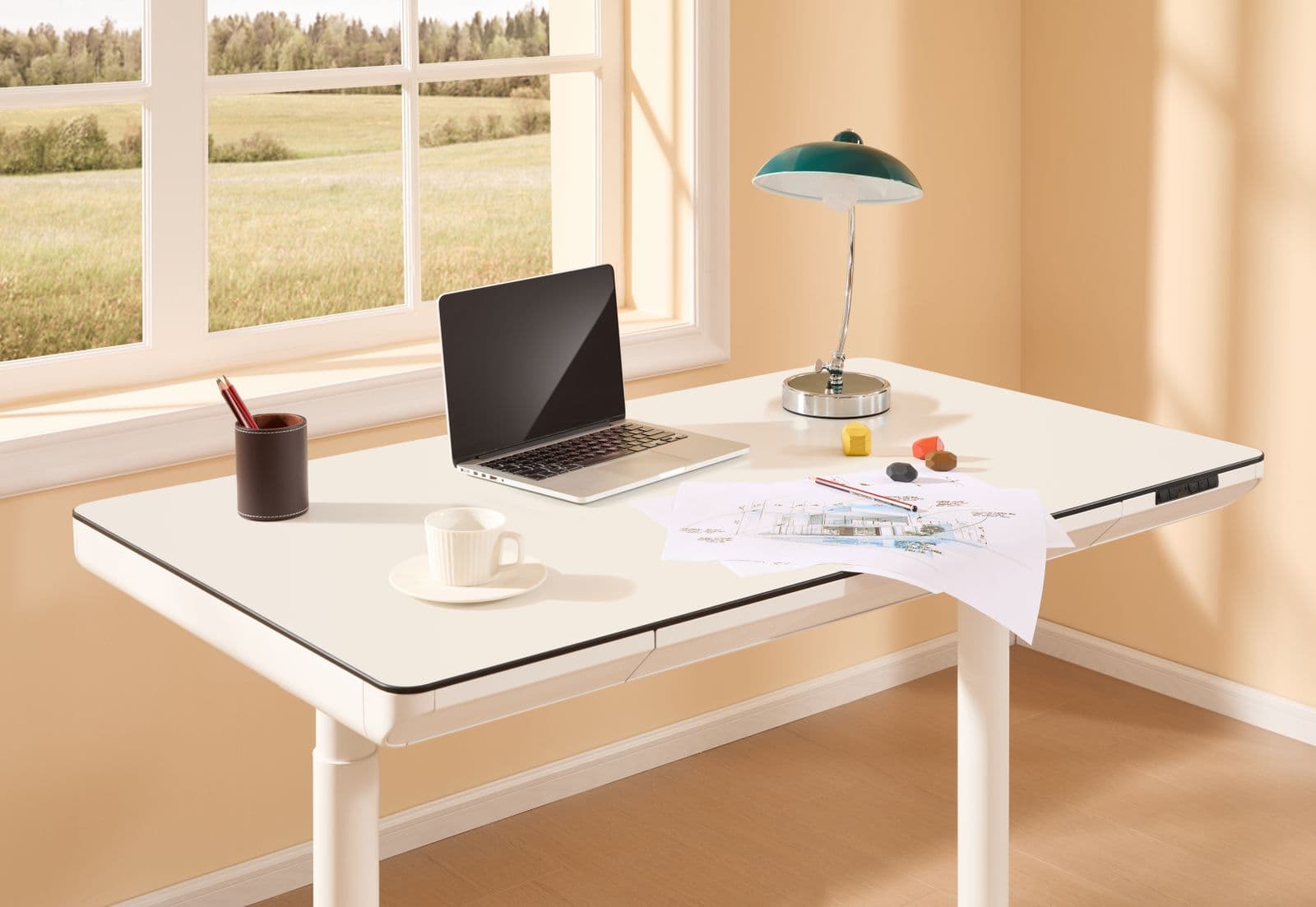
BIZUM Electric Standing Desk

BIZUM Electric Standing Desk
A budget electric sit-stand desk with two built-in drawers, aimed at a small room. What it buys is storage and a finished top in one box at the entry end of the price band. Check its minimum height against your seated elbow measurement first.
We may earn a commission on this link. It never changes the ranking.
- Type
- Electric standing desk with 2 drawers
- Control
- Height presets
- Storage
- Two built-in drawers
- Best for
- A small room that needs storage
- Buy on
- Its minimum height against your seated measurement
What works
- Drawers built in, so storage does not need a separate cabinet
- A complete finished desk in one box, no top to source
- Compact footprint for a small room
- Height presets for one-touch sit to stand
What to know
- A budget frame's minimum height can sit too high for shorter adults once you sit
- Lighter capacity than a heavy commercial frame
- A pressed top rather than a solid-core surface
- Budget frames move more at full standing height than commercial ones
Wrong for you if your seated elbow height is on the shorter side, or if you are putting three monitors and a PC tower on it. Both are specification limits rather than opinions.
FEZIBO Electric Standing Desk

FEZIBO Electric Standing Desk
A 48 by 24 electric desk with built-in drawers and height presets, a sensible middle option in the budget tier. Confirm its height range brackets your standing elbow height, because that is where a budget desk cuts the corner.
We may earn a commission on this link. It never changes the ranking.
- Type
- Electric standing desk with drawers
- Size
- 48 by 24 inch top
- Control
- Height presets
- Storage
- Built-in drawers
- Buy on
- Its height range against your measurements
What works
- Built-in drawers add storage a bare frame does not
- 48 by 24 top fits most home setups
- Height presets for one-touch switching
- A complete desk in one box
What to know
- A budget frame's minimum can sit too high for shorter users
- Lighter capacity than a commercial frame, thin past two monitors
- A pressed top, not solid-core
- Assembly is a two-person job
Wrong for you if you need the desk to drop very low with a top on, or if you want a large multi-monitor surface. Both are the tier's limits.
FlexiSpot Electric Standing Desk (71x32)

FlexiSpot Electric Standing Desk (71x32)
A large 71 by 32 electric desk from FlexiSpot, one of the established names in the category. The big surface takes two monitors and a keyboard tray with room to spare, and FlexiSpot frames are known for reaching a lower minimum height than many budget desks, which matters for shorter adults.
We may earn a commission on this link. It never changes the ranking.
- Type
- Electric standing desk, dual motor
- Size
- 71 by 32 inch top
- Control
- Programmable height presets
- Cable
- Built-in cable management
- Best for
- A large two-monitor workspace
What works
- Large 71 by 32 surface with room for two monitors and more
- From an established standing-desk brand rather than a marketplace no-name
- Dual-motor lift handles a loaded desktop
- Built-in cable management
What to know
- A big top needs the room to take it
- Heavier to assemble, a two-person job
- A budget desktop is not a solid-core surface
- Check the minimum height against a short seated measurement
Wrong for you if your room cannot take a 71-inch top. The smaller desks above fit where this will not.
FlexiSpot E6 Max, the step up

FlexiSpot E6 Max Standing Desk
A 3-stage dual-motor frame, which buys the wide height range that decides whether a desk fits the person rather than the room. The extra leg stage drops lower and rises higher than a 2-stage budget frame, so it covers the tall and the short that cheaper desks exclude.
We may earn a commission on this link. It never changes the ranking.
- Type
- Electric sit-stand frame, dual motor
- Legs
- 3-stage, wider travel than 2-stage frames
- Control
- Programmable height presets
- Buy on
- Its max and min height against your measurements
- Best for
- Users the cheaper 2-stage frames top out on
What works
- 3-stage legs give more height range than a 2-stage frame
- Dual motors raise a loaded top smoothly
- Reaches lower and higher than most budget frames
- Height presets for one-touch switching
What to know
- A frame only, so you source or reuse a top
- A wide range is wasted if a cheaper frame already reaches your numbers
- Assembly is a two-person job
- Costs more than the entry budget desks
Wrong for you if a cheaper frame already reaches both your measurements. The extra range is only worth paying for if you sit near an edge.
The specification that trips people up most
Many budget desks have a frame minimum somewhere around 27 to 28 inches. That sounds like a detail and it is not.
Add a one inch desktop and those desks put your working surface near 28 inches at their lowest setting. A seated elbow height that low corresponds to a fairly tall adult. Anybody shorter is sitting at a desk that cannot come down to meet them, and the compensation is a permanent low-grade shrug in both shoulders for eight hours a day. It is the exact problem a height-adjustable desk was bought to solve, reintroduced at the bottom of the range where nobody looks.
This is why frames with a genuinely low minimum cost more to engineer. A frame that drops close to 22 inches is the specification that quietly determines whether the desk fits the person rather than the room, and it is worth paying for if your seated measurement is on the shorter side.
The same arithmetic applies at the top. A high standing elbow height can pass the ceiling of a two-stage budget frame once a desktop is on. Both ends of the range exclude somebody, and the listing never says who.
Which one
You have a tight budget and a small room: the BIZUM, checking its minimum height against your seated measurement.
You want a solid mid-tier budget desk with storage: the FEZIBO.
You want a large surface from an established brand: the FlexiSpot 71x32.
Your measurements are near the edge on every cheaper desk: the FlexiSpot E6 Max frame, for the 3-stage range.
You already own a desk you like: none of them. A converter sits on top of what you have for a fraction of the money, with its own set of trade-offs.
Whichever you buy, the desk is only half of it. The trial evidence on how much to actually stand puts the useful target at around 83 minutes a workday, which is a great deal less than most people assume when they order one of these.
Questions people actually ask
Is a $300 standing desk worth buying?
It is if its published range covers your seated and standing elbow heights and you are not loading it heavily. The visible compromises at that price are weight capacity, travel range and warranty length, and none of those matter to somebody with a laptop and a single monitor whose measurements fit.
How much weight capacity do I actually need?
Far less than any of these ratings. A monitor, a laptop, a dock and the usual clutter rarely passes 60 lb. The rating matters as a proxy for how much steel is in the columns, which is what determines how much the desk moves at standing height.
Two-stage or three-stage frame?
Two-stage if both your measurements fit inside its adjusted range, because more stages means less overlap per joint at full extension. Three-stage if either measurement is near an edge, since it reaches lower and higher for the same footprint.
Why are prices not listed here?
Standing-desk prices move constantly with promotions and configurations, so any figure printed on this page would be wrong within a week. The specifications are stable and are described above; the price has to be read at the listing.
Do these include a desktop?
The complete desks ship with a top. A frame-only option like the E6 Max needs you to source or reuse one, which is both a saving and a task. Always check what is in the listing before comparing.
Sources
- Edwardson et al., "Effectiveness of the Stand More AT (SMArT) Work intervention: cluster randomised controlled trial", BMJ, 2018. PMC6174726
As an Amazon Associate we earn from qualifying purchases. We earn a commission on some links, at no extra cost to you. It never changes which products we recommend or how they score. Full disclosure

Who wrote this
Editor, hardware and workstation geometry
Ellis Warner edits A Better Posture and writes the hardware side of it: desks, chairs, monitor arms and the measurements that decide whether any of them help. He reads the specification sheet, the warranty and the returns policy in full before he reads a single review, because that is where the differences between two apparently identical products actually live.
More from EllisThe standard
How this guide was built
- Manufacturer specification sheets and warranty terms, read in full rather than summarised from a listing.
- Published clinical trials and standards bodies where they exist, cited by name and linked.
- Owner reports at volume, including the one-star reviews, which is where failure modes live.
- Every price checked against the live listing on the date printed beside it.