Best Standing Desk Converters for a Desk You Cannot Replace
Four converters compared on lifting capacity, work surface and lift range. The spread between them is larger than the price difference suggests.
By Ellis Warner, editor, hardware and workstation geometry
Published Aug 18, 2026 · 8 min read
- Updated August 18, 2026
- 8 min read

In this guide
A converter is the answer to a specific situation: the desk stays, because it is built in, rented, shared, or simply good. Something has to sit on top of it and lift your work to standing height.
The category looks homogeneous and is not. The four below run from a slim laptop platform to a powered two-monitor workstation, and the gap between them in what they can actually lift is wider than the price gap suggests.
Specifications below are from the published product listings.
The specification that decides everything
Lifting capacity. Not the weight the surface can hold statically, the weight the mechanism can raise. A spring-assisted converter is tuned to a load range, and one carrying less than it expects springs up alarmingly while one carrying more will not budge.
This is where the category's biggest gap is, and it is almost never the number people compare. A light spring-assisted riser tops out well below what a two-monitor setup weighs, while a heavier-duty riser at a similar price carries several times as much. The capacity is rarely the number the listings put first.
Weigh what is going on it before you shop. Two 27-inch monitors and a mechanical keyboard is more than a laptop platform is tuned to lift.
Work surface, both tiers. A converter with a keyboard tray has two surfaces, and the top one is smaller than the footprint suggests. Check the published dimensions rather than the photograph.
What it does to your desk height. Every converter has a closed height, and that height is added to your desk permanently. A converter that sits three inches proud has raised your seated typing surface by three inches, which is enough to shrug your shoulders all day if your desk was already correct. This is the trade nobody mentions, and it is why the thin ones matter.
STANDNEE Standing Desk Converter

STANDNEE Standing Desk Converter
A slim, fully assembled riser that lifts your work to standing height without much added desk height when closed. The lighter the load it is tuned for, the smoother it rises, which makes this the honest choice for a laptop rather than a heavy two-monitor stack.
We may earn a commission on this link. It never changes the ranking.
- Type
- Sit-stand desk converter
- Assembly
- Ships assembled, ready to use
- Adjustment
- Squeeze-lever height, holds at any point
- Best for
- A laptop or a single light monitor
- Note
- Its closed height adds to your seated desk height
What works
- Fully assembled out of the box
- Slim enough not to add much seated desk height
- Squeeze-lever adjustment holds at any point in the range
- Cheapest way into the category
What to know
- Spring tuned for lighter loads, so a heavy two-monitor setup is not its job
- A compact top is a laptop and a mouse, not a full workstation
- Its closed height still adds to your seated typing height
- Single-tier, so the keyboard rises with the screen
Wrong for you if you run a heavy two-monitor setup. A light riser is tuned for a laptop, not a wall of screens.
VIVO 36-inch Desk Converter

VIVO 36-inch Desk Converter
A wide 36-inch riser with a two-tier surface and a quick sit-to-stand lift, assembled out of the box. The broad top is deep enough for a monitor at a real viewing distance, and the separate keyboard tier keeps typing below the screen.
We may earn a commission on this link. It never changes the ranking.
- Type
- Two-tier sit-stand converter
- Width
- 36 inch surface
- Adjustment
- Gas-spring, quick sit to stand
- Keyboard
- Lower removable keyboard tray
- Best for
- A single-monitor workstation
What works
- Wide 36-inch top with room for a monitor at a real viewing distance
- Two-tier design keeps the keyboard below the screen
- Gas-spring lift raises and lowers in one motion
- Arrives assembled
What to know
- A wide converter is heavy and not moving once placed
- The spring is tuned to a load range, so weigh a two-monitor setup first
- Its closed height adds to your seated typing height
- Takes real desk depth to sit on
Wrong for you if your desk is shallow. A 36-inch two-tier riser needs the depth to sit on.
TechOrbits Standing Desk Converter
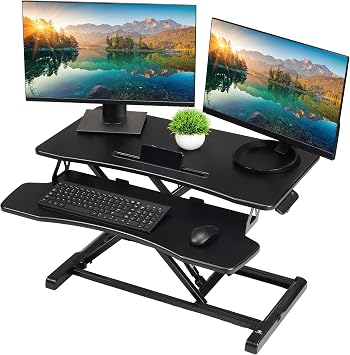
TechOrbits Standing Desk Converter
A sturdy two-tier riser sized for two monitors and a keyboard, with a manual spring lift and no power supply to fail. For anyone with more than a laptop, a heavier-duty riser like this is the pick over a light single-screen platform.
We may earn a commission on this link. It never changes the ranking.
- Type
- Two-tier manual sit-stand converter
- Adjustment
- Spring-assisted, manual
- Surface
- Sized for two monitors and a keyboard
- Power
- None, nothing to fail electrically
- Best for
- A dual-monitor setup
What works
- Sized for two monitors and a keyboard tray rather than a laptop
- Manual mechanism means no power supply and nothing to fail electrically
- Two-tier layout keeps the keyboard below the screens
- Sturdier lift than a light single-screen platform
What to know
- Manual lift needs a deliberate two-handed movement some people stop making
- Arrives requiring more setup than a fully assembled converter
- Inherits whatever wobble the desk underneath it has
- Weigh your monitors, since any spring lift is tuned to a range
Wrong for you if you want it to arrive assembled and never be touched. That is the VIVO.
FlexiSpot Electric Converter
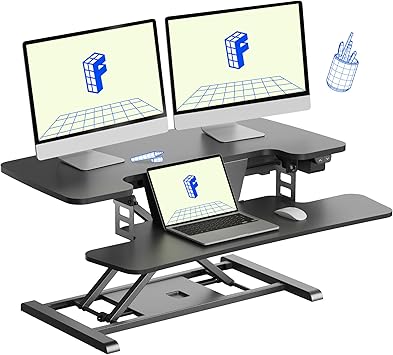
FlexiSpot Electric Desk Converter
A motorized riser with button-press height adjustment and a tiered keyboard surface. It costs more than most manual converters and about as much as a complete standing desk, which is only rational when replacing the desk is genuinely impossible.
We may earn a commission on this link. It never changes the ranking.
- Type
- Electric sit-stand converter
- Adjustment
- Motorized, button press
- Keyboard
- Tiered, separate from the monitor surface
- Power
- Needs a mains outlet at the desk
- Best for
- Daily use without a manual lift
What works
- Button-press adjustment, the difference between using it daily and not
- Tiered keyboard surface puts the keyboard below the monitor, the correct geometry
- Motorized lift handles a heavier load without effort
- The only powered option here
What to know
- Costs more than most manual converters and near a complete standing desk
- Needs a power outlet at the desk
- Its closed height still adds to your seated typing height
- An electric riser on a wobbly desk just inherits the wobble
Wrong for you if you could replace the desk. At this price you should.
Which one
Laptop only, and your desk height is already correct: the STANDNEE. A slim closed height is the whole argument.
One monitor, and you want it to arrive assembled: the VIVO 36-inch, keeping the load within what its spring is tuned for.
Two monitors: the TechOrbits. The heavier-duty capacity at a manual-converter price is the outlier in this category.
You know you will not lift a manual one: the FlexiSpot electric, having first checked that replacing the desk is genuinely impossible, because that money buys a whole standing desk with a wider range and no added desk height.
One thing every converter inherits: the stability of the desk underneath it. Putting a 52 lb converter with two monitors on a flexible dining table produces movement that no converter specification predicts, and the same variables that govern desk wobble apply to the stack as a whole.
And having raised the surface, set the standing height properly rather than to whichever detent feels about right. A converter that puts your keyboard two inches high does the same damage a desk at the wrong height does. How much of the day to spend up there is a separate question with better evidence behind it than most people assume.
Questions people actually ask
How much weight can a standing desk converter hold?
The number that matters is lifting capacity, not static capacity, and the range across this category is enormous. A slim laptop platform is tuned for a light load, while a heavier-duty two-tier riser carries several times as much. Weigh your monitors before choosing, because a spring-assisted riser carrying more or less than it expects either will not lift or springs up alarmingly.
Do standing desk converters raise your sitting height?
Yes, by their closed height, and that is the most commonly ignored trade-off in the category. A converter sitting three inches proud has permanently raised your seated typing surface by three inches. The slimmest risers are around an inch closed, which is why they exist.
Is a converter cheaper than a standing desk?
At the bottom of the range, yes. At the top it is not: a powered converter costs more than a complete budget standing desk and about the same as a mid-range one. A converter is worth paying a premium for only when the desk genuinely cannot be replaced.
Manual or electric converter?
Manual mechanisms have nothing to fail electrically and need no outlet, but they need a deliberate two-handed movement that people stop making. If you already know you will not do that several times a day, electric is worth the money. If you will, it is not.
Will a converter wobble?
It inherits whatever the desk underneath it does, and then adds its own height to the lever. A stable converter on a flexible table moves. Check the desk first, and the same fixes apply: level feet, rigid floor contact, heaviest mass toward the back.
Sources
- Working posture guidance: OSHA Computer Workstations eTool.
As an Amazon Associate we earn from qualifying purchases. We earn a commission on some links, at no extra cost to you. It never changes which products we recommend or how they score. Full disclosure

Who wrote this
Editor, hardware and workstation geometry
Ellis Warner edits A Better Posture and writes the hardware side of it: desks, chairs, monitor arms and the measurements that decide whether any of them help. He reads the specification sheet, the warranty and the returns policy in full before he reads a single review, because that is where the differences between two apparently identical products actually live.
More from EllisThe standard
How this guide was built
- Manufacturer specification sheets and warranty terms, read in full rather than summarised from a listing.
- Published clinical trials and standards bodies where they exist, cited by name and linked.
- Owner reports at volume, including the one-star reviews, which is where failure modes live.
- Every price checked against the live listing on the date printed beside it.