Standing Desks for Short Users: The Floor Is the Problem, Not the Ceiling
Most desks bottom out at 28 inches. A five-foot-two person needs about 24 seated. Which desks close that gap, and what to do when none of them will.
By Ellis Warner, editor, hardware and workstation geometry
Published Aug 31, 2026 · reviewed Sep 4, 2026 · 12 min read
- Updated September 4, 2026
- 12 min read

In this guide
The height problem at the short end of the market is the exact inverse of the one at the tall end, and it is worse. A tall person struggles to raise a desk high enough to stand at. A short person struggles to lower one far enough to sit at, which means the desk is wrong for the majority of the working day rather than the minority.
Here is why that asymmetry exists. A six-foot-six person needs a seated surface somewhere around 30 to 34 inches, and every height-adjustable desk on the market passes through that band. A five-foot-two person needs a seated surface around 23 to 25 inches, and most desks stop three to five inches above it. The tall problem is a ceiling problem that shows up when you stand. The short problem is a floor problem that shows up every time you sit down, which is most of the day.
The arithmetic
Published seated-height guidance converges on a regression against stature rather than a single number. Working from the commonly used formulas, the seated surface target lands here:
| Your height | Seated surface target | Standing surface target |
|---|---|---|
| 5'0" (60 in) | 21.8 to 23.8 in | About 36.5 in |
| 5'2" (62 in) | 22.7 to 25.0 in | About 37.7 in |
| 5'4" (64 in) | 23.7 to 26.0 in | About 38.9 in |
| 5'6" (66 in) | 24.6 to 27.1 in | About 40.1 in |
Now compare that against what desks actually do at the bottom of their travel. A two-stage frame typically bottoms out between 27 and 29 inches. Two manufacturer figures make the pattern concrete: the two-stage Jarvis frame starts at 29 inches, and the two-stage Autonomous frame at 28.3. Against a five-foot-two target of roughly 23 to 25 inches, that is a miss of three to six inches, and there is no setting that fixes it.
The standard is again the reason. ANSI/BIFMA G1-2013 recommends a span of about 22 to 46.5 inches sized for the 5th-percentile woman through the 95th-percentile man, which is roughly five feet to six foot three. A desk that starts at 28 inches is not meeting that recommendation at the low end at all, and plenty of desks do not.
The third leg segment is the whole story
The specification that predicts whether a desk reaches your seated number is not the motor, the brand or the price. It is how many segments each leg has.
Same brand, same model, one variable changed:
| Desk | Two-stage legs | Three-stage legs | Gained at the bottom |
|---|---|---|---|
| Jarvis | 29.0 to 48.3 in | 24.5 to 50.0 in | 4.5 in |
| Autonomous | 28.3 to 47.5 in | 26.2 to 52.0 in | 2.1 in |
| iMovR Lander Lite | 26.6 to 46.75 in | 23.25 to 49.25 in | 3.35 in |
Three data points, an average of about 3.3 inches gained at the floor and about 2.9 at the ceiling, for roughly six inches of extra usable travel. For a short user, that third segment is not an upgrade. It is the difference between a desk that fits and a desk that does not.
It is also, almost universally, an upcharge. The cheapest configuration of most lines is the two-stage one, which means the buyer who most needs the range is the one asked to pay extra for it. That is worth knowing before a listing convinces you the base model is the sensible choice.
One terminology warning, because it produces genuinely wrong purchases: iMovR calls its three-segment legs "dual-stage" and its two-segment legs "single-stage," while everyone else calls the same things three-stage and two-stage. Count the segments in the photograph rather than trusting the word.
Two desks that actually reach
Two mainstream desks get close enough to matter. Both use three-stage legs, which is not a coincidence. One of them clears the five-foot target outright and the other stops at about five foot two, and the second difference between them is whether you would rather buy a finished desk or a frame and a top.
UPLIFT V3

UPLIFT V3 Standing Desk
Published at 22.6 inches at the bottom with a one-inch desktop already accounted for, which is the lowest finished worksurface among the mainstream brands and low enough that a five-foot user needs no keyboard tray at all. UPLIFT built this range for exactly this problem: its predecessor frame was sold specifically as the short-user option.
We may earn a commission on this link. It never changes the ranking.
- Height range
- 22.6 to 48.7 in, quoted with a 1 in top
- Floor height
- 22.6 in, below the 5'0" seated target
- Capacity
- 355 lb
- Frame
- C-frame, three-stage, no lower crossbar
- Warranty
- 15 yr covering electronics
- Top on this listing
- 42 x 30 in laminate
What works
- Goes low enough that the seated position needs no accessory to correct it
- No lower crossbar, so a keyboard tray or a chair base has room if you want one anyway
- Fifteen-year term covers the motors and controller rather than only the frame
- Arrives as a complete desk
What to know
- The lowest-reaching option is also among the more expensive
- Ceiling of 48.7 in makes it a poor choice for a tall person sharing the desk
- Wide desktops add substantially to the price
- The term reduces proportionally above forty hours of use a week
Wrong for you if you share the desk with someone over six foot three. Its ceiling is the compromise for that floor.
FlexiSpot E6 frame
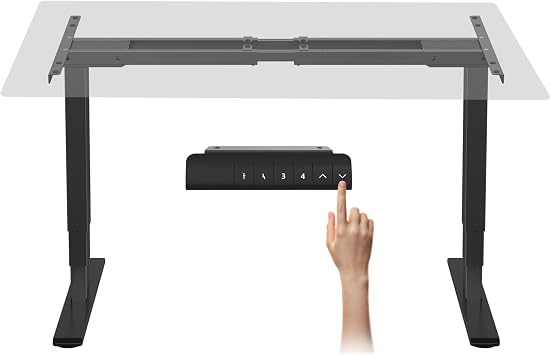
FlexiSpot E6 Standing Desk Frame
Published at 23.6 inches excluding the desktop, so about 24.6 inches once a one-inch top is fitted. Read that against the table above and the line is clear: it sits inside the seated target for someone around five foot two and above the target for a five-foot-nothing user. It is the cheaper of the two options here by a wide margin, and three stages is the specification that decides both of them.
We may earn a commission on this link. It never changes the ranking.
- Height range
- 23.6 to 48.8 in, excluding the desktop
- Topped floor
- About 24.6 in with a 1 in top
- Fits
- The 5'2" seated target, not the 5'0" one
- Capacity
- 220 lb
- Frame
- Three-stage
- Motors
- Dual
What works
- Three-stage legs at the price the category charges for two segments
- Reaches four inches below where a typical two-stage frame stops
- A thinner desktop buys back some of the difference against the UPLIFT
- Frame-only, so an existing desktop you like can be reused
What to know
- Does not reach the 5'0" seated target, which the UPLIFT does
- Every published figure needs the top thickness added before comparing
- 220 lb rating includes the desktop you bolt to it
- You have to supply, drill and mount that desktop
Wrong for you if you are five foot or under. The arithmetic does not get there, and no desktop thickness makes it better.
If the desk will not go low enough
Sometimes the desk is not yours to choose. The published fix, and the one with the strongest reasoning behind it, is a keyboard tray, and the detail that almost every article omits is that it has to be the right kind.
Cornell's ergonomics guidance is specific: the ideal arrangement puts the keyboard on "a height adjustable negative-tilt tray", with the elbow angle at or greater than 90 degrees and the keyboard base sloping gently away from you. A flat tray four inches lower fixes your elbow height and introduces wrist extension, which trades one problem for another. The negative tilt is the part that makes it work, and it is the part cheap trays leave out. UPLIFT's own comparison chart puts the available correction at up to five inches down, which covers most of the gap a 28-inch floor creates.

Uncaged Ergonomics Under Desk Keyboard Tray
A slide-out steel tray with negative or neutral tilt, 360-degree swivel and an adjustable mouse platform, listed as dropping ten inches below the desk surface. The negative tilt is the specification that matters here, because a tray that only lowers the keyboard without sloping it away creates wrist extension while it fixes elbow height.
We may earn a commission on this link. It never changes the ranking.
- Type
- Under-desk slide-out tray
- Tilt
- Negative or neutral
- Drop
- Listed at 10 in below the surface
- Mouse
- Adjustable mouse platform
- Frame
- Steel
- Mounting
- Bolts to the underside of the desktop
What works
- Negative tilt rather than a flat platform, which is the arrangement the guidance actually specifies
- Ten inches of drop covers the gap a 28-inch desk floor creates
- Separate mouse platform keeps the mouse at the same height as the keyboard
- Works on a fixed desk as well as a sit-stand one
What to know
- Needs clear space under the desktop, which frames with crossbars and control boxes often do not have
- Bolting to the underside of a desktop is not reversible without leaving holes
- Adds an object between you and the desk that has to be slid out and back
- Does nothing for the standing position, only the seated one
Before ordering one, look underneath the desk. Standing desk frames put crossbars, control boxes and cable trays in exactly the space a keyboard tray needs, and owners regularly find the prescribed fix physically blocked by the mechanism of the desk it is meant to correct. No manufacturer publishes a tray clearance figure, so this is a tape measure job.
The other published route is to raise the chair instead. OSHA's guidance is that "if the seat cannot be lowered, use a footrest to provide stable support for the feet", which restores the thigh support you lose by raising the chair. It works, and it is a three-part compensation rather than a one-part fix: chair up, footrest in, monitor down to match the new eye height. Whether footrests earn their place is a question with its own evidence, and worth reading before you buy one on the assumption that it is the easy answer.
What to do, in order
- Measure rather than estimate. The measuring guide gives you a seated number and a standing number. Everything below depends on having both.
- Compare against the desk's floor, not its range. A 26-inch span is irrelevant if it starts three inches above where you need it.
- Normalise for the desktop. FlexiSpot publishes frame-only figures, UPLIFT publishes topped ones. Add your top thickness to any frame-only number before comparing.
- Count the leg segments. Three beats two by about three inches at the bottom, and that is usually the entire difference between fitting and not.
- If the desk is fixed, fit a negative-tilt tray and check the clearance first. Then get the keyboard and mouse geometry right, because a tray at the wrong angle is not an improvement.
The mid-range case is covered in the main desk guide, and the mirror-image failure, a ceiling that will not reach, catches people at the other end of the same standard.
Questions people actually ask
What desk height do I need if I am 5 foot 2?
Roughly 23 to 25 inches for the seated surface and about 37.7 inches standing. The seated figure is the one that causes trouble, because a large share of height-adjustable desks bottom out between 27 and 29 inches, three to six inches above where a five-foot-two person needs to type.
Which standing desks go below 25 inches?
Among the mainstream brands, the UPLIFT V3 at 22.6 inches with a one-inch top already counted, and the FlexiSpot E6 frame at 23.6 inches excluding the desktop, which lands near 24.6 topped. Both use three-stage legs, which is the specification that makes a low floor possible.
Is a three-stage standing desk worth it if I am short?
Yes, and it is usually the only thing that matters. Comparing the same desk in both configurations, the third leg segment buys about three inches at the bottom of the range. For a short user that is the difference between a correct seated height and a permanent compromise, which is not true of any other upgrade on the options list.
Will a footrest fix a desk that is too high?
Partly. Raising the chair puts your elbows at the right height and takes your feet off the floor, and the footrest restores the support you lost. It leaves the monitor too high relative to your new eye position, so it is a three-part adjustment rather than a fix. A negative-tilt keyboard tray solves the same problem in one step where there is clearance for one.
Why does a keyboard tray have to tilt away from me?
Because lowering a flat keyboard fixes your elbow height and forces your wrists into extension to reach the keys. Cornell's guidance specifies a negative-tilt tray for that reason: the keyboard sits below seated elbow height and slopes gently away, which keeps both the elbow angle and the wrist neutral at the same time.
Sources
- The 5th-percentile-woman to 95th-percentile-man basis of the ANSI/BIFMA G1-2013 range from UPLIFT's published height-range document.
- UPLIFT's published correction figures for a keyboard tray, and its frame-only versus topped measurements, from UPLIFT's desk frame comparison chart.
- UPLIFT V3 range and warranty from the UPLIFT standing desk page (upliftdesk.com) and UPLIFT's warranty terms.
- FlexiSpot E6 frame range, capacity and motor specification from the product listing, read 4 September 2026, with the general terms on FlexiSpot's warranty page.
- Negative-tilt keyboard tray guidance and the elbow angle rule from Cornell University's computer workstation ergonomics guidelines.
- Chair height and footrest guidance from the OSHA Computer Workstations eTool.
As an Amazon Associate we earn from qualifying purchases. We earn a commission on some links, at no extra cost to you. It never changes which products we recommend or how they score. Full disclosure

Who wrote this
Editor, hardware and workstation geometry
Ellis Warner edits A Better Posture and writes the hardware side of it: desks, chairs, monitor arms and the measurements that decide whether any of them help. He reads the specification sheet, the warranty and the returns policy in full before he reads a single review, because that is where the differences between two apparently identical products actually live.
More from EllisThe standard
How this guide was built
- Manufacturer specification sheets and warranty terms, read in full rather than summarised from a listing.
- Published clinical trials and standards bodies where they exist, cited by name and linked.
- Owner reports at volume, including the one-star reviews, which is where failure modes live.
- Every price checked against the live listing on the date printed beside it.