Best Vertical Mice for Wrist Pain: What the Forearm Research Measured
A vertical mouse cuts forearm pronation from about 42 to 28 degrees in the lab. Four models checked against that finding, and who each one is wrong for.
By Ellis Warner, editor, hardware and workstation geometry
Published Sep 27, 2026 · 12 min read
- Updated September 27, 2026
- 12 min read

In this guide
- What a vertical mouse changes, in numbers
- What the trials found about symptoms
- What OSHA says about pointing devices
- Three checks before you buy
- Logitech Lift Vertical Ergonomic Mouse
- Logitech MX Vertical Wireless Mouse
- Anker 2.4G Wireless Vertical Ergonomic Optical Mouse
- Logitech Lift Left Vertical Ergonomic Mouse
- Which one
- What a vertical mouse will not fix
- Sources
A conventional mouse asks you to turn your forearm until the palm faces the desk. That rotation is called pronation, and you hold it for as long as your hand is on the mouse. A vertical mouse stands the grip on its side so the palm faces inward, closer to a handshake, and the forearm does less turning to reach it.
That is the whole idea, and it addresses one specific complaint. If the ache is in the forearm or the top of the wrist, a vertical mouse is aimed at it. If the ache is in one shoulder, it almost certainly is not, and the fix is somewhere else on the desk.
What a vertical mouse changes, in numbers
The clearest measurement comes from Quemelo and Vieira, published in Ergonomics in 2013. Sixteen participants used a standard mouse and a vertical mouse while the researchers recorded forearm angles with electrogoniometers and muscle activity with electromyography.
The vertical mouse reduced pronation from 42 degrees to 28 degrees. Activity in the extensor carpi, the muscle along the top of the forearm that holds the wrist up, fell from 16 percent to 13 percent of its reference level. The extensor digitorum, which lifts the fingers, fell from 13 percent to 10 percent. Wrist deviation moved from 7 degrees toward the thumb side to 5 degrees toward the little-finger side.
Then the cost. Time to reach a target in a standard pointing test rose from 3.4 seconds to 4.2 seconds, and the authors concluded that users needed training and time to adapt. Satisfaction scored 68, which they described as good.
So the posture change is sizeable, 14 degrees of forearm rotation, the muscle change is modest, three percentage points, and you will be slower for a while.
What the trials found about symptoms
Posture studies measure angles. Whether anybody hurts less takes a longer trial, and the best one is a randomised controlled trial by Conlon, Krause and Rempel, published in Occupational and Environmental Medicine in 2008. It followed 206 engineers who used a computer for more than 20 hours a week for a full year. They were randomised to a conventional mouse, an alternative mouse, a forearm support board, or both.
The alternative mouse group had fewer new cases of right upper extremity disorders, with a hazard ratio of 0.57. The confidence interval ran from 0.24 to 1.34, and the result was not statistically significant. Neck and shoulder discomfort also fell slightly, and that was not significant either. The intervention that did produce a significant reduction in right arm discomfort was the forearm support board, not the mouse.
A follow-up paper from the same trial, published in the American Journal of Industrial Medicine in 2009, measured nerve conduction at the wrist in 154 of the engineers. The alternative mouse had a protective effect on the ulnar nerve, with an odds ratio of 0.47. It had no significant effect on the median nerve, which is the one involved in carpal tunnel syndrome.
So the honest summary is this. A vertical mouse measurably changes forearm posture and muscle load. In the one year-long trial, the direction of the effect on symptoms was favourable but not proven, and the one nerve finding concerned the ulnar side, not carpal tunnel. If carpal tunnel is your diagnosis, a vertical mouse is not a treatment for it, and a clinician is the right person to ask.
What OSHA says about pointing devices
OSHA's Computer Workstations eTool treats the mouse as two problems. On placement, a mouse away from the keyboard exposes you to awkward postures, contact stress and forceful exertions. On size and shape, choose a device designed to fit the hand that will operate it, needing minimal force, with sensitivity set for a light touch.
Neither point is about verticality. A vertical mouse placed a foot to the right of a full-size keyboard fixes your forearm and leaves your shoulder winged out all day. Where the mouse sits relative to the keyboard is the first thing to get right, and it costs nothing.
Three checks before you buy
Match the size to your hand. Logitech positions the Lift for small to medium hands and the MX Vertical for medium to large hands. A mouse that is too large forces a stretched grip, and one that is too small leaves the fingers curled and tense.
Match the hand. Most vertical mice are right-handed only, because the shape is asymmetric by design. If you mouse with your left, the list is short.
Plan for the slow week. The 2013 study found a 0.8 second penalty per target. Set the pointer speed a notch higher than usual, and give it a fortnight before deciding.
All four picks below were checked as live Amazon listings with a price on 2026-09-27, and every one was at or below the manufacturer's own list price.
Logitech Lift Vertical Ergonomic Mouse
Wrong for you if your hands are large, because Logitech sizes this one for small to medium hands and a big hand will overhang it.

$64.79
Price checked Sep 27, 2026
Logitech Lift Vertical Ergonomic Wireless Mouse, Graphite
A 57 degree vertical mouse sized for smaller hands, which is the part of the market the older vertical designs ignored. It runs on a single AA battery that Logitech rates at 24 months, connects by Bluetooth or the included Logi Bolt receiver, and pairs with up to three devices. At 125 g and 71 mm tall it is noticeably smaller than the MX Vertical.
We may earn a commission on this link. It never changes the ranking.
- Angle
- 57 degrees
- Hand size
- Small to medium, per Logitech
- Dimensions
- 71 mm tall, 70 mm wide, 108 mm long
- Weight
- 125 g
- Battery
- 1 AA, rated 24 months
- Connection
- Bluetooth or Logi Bolt, up to 3 devices
- Sensor
- 400 to 4,000 DPI
What works
- Sized for the hands most vertical mice are too big for
- A single AA rated for two years, so no charging routine
- Quiet clicks, per Logitech's own listing
- Sold below Logitech's own $79.99 list price
What to know
- Too small for large hands, by Logitech's own sizing
- Logi Bolt receiver will not pair with older Unifying receivers
- No wired mode if the battery dies mid-task
- Right-handed as sold here, with the left version a separate model
For most people with small or average hands, this is the default pick.
Logitech MX Vertical Wireless Mouse
Wrong for you if your hands are small, because Logitech describes this one as great for large to medium hands and it is the bulkiest mouse on this list.

$77.99
Price checked Sep 27, 2026
Logitech MX Vertical Wireless Mouse, Graphite
The same 57 degree angle in a larger, heavier body with a rechargeable battery. Logitech claims it reduces muscular strain by 10 percent compared with a traditional non-vertical mouse, a manufacturer figure rather than a published trial. Easy-Switch moves between three paired computers from a button on the base.
We may earn a commission on this link. It never changes the ranking.
- Angle
- 57 degrees
- Hand size
- Medium to large, per Logitech
- Dimensions
- 78.5 mm tall, 79 mm wide, 120 mm long
- Weight
- 135 g
- Battery
- 240 mAh rechargeable, up to 4 months per charge
- Connection
- Unifying receiver, Bluetooth or USB-C cable
- Sensor
- 400 to 4,000 DPI
What works
- Fits the larger hands the Lift is not built for
- Works wired over USB-C while charging
- Easy-Switch between three computers
- Priced well below Logitech's $119.99 list
What to know
- The largest and heaviest mouse here
- Uses the older Unifying receiver rather than Logi Bolt
- Right-handed only
- The 10 percent strain figure is Logitech's own claim
If the Lift is too small, this is the step up.
Anker 2.4G Wireless Vertical Ergonomic Optical Mouse
Wrong for you if you need Bluetooth, because this one connects only through its USB receiver, which rules out most tablets and any laptop short on USB-A ports.

$29.99
Price checked Sep 27, 2026
Anker 2.4G Wireless Vertical Ergonomic Optical Mouse
Anker publishes three sensitivity settings, 800, 1,200 and 1,600 DPI, a 120 mm long body at 3.4 oz, and a power-saving mode that cuts power completely after eight minutes idle. It runs on two AAA batteries that are not included. At under half the price of the Lift, it answers whether you will keep using a vertical mouse at all.
We may earn a commission on this link. It never changes the ranking.
- Dimensions
- 120 mm long, 62.8 mm wide, 74.8 mm tall
- Weight
- 3.4 oz
- Sensor
- 800, 1,200 or 1,600 DPI
- Battery
- 2 AAA, not included
- Connection
- 2.4 GHz USB receiver only
- Buttons
- 5, including back and forward
What works
- Under half the price of any Logitech option
- Power cuts out completely after eight minutes idle, which stretches the batteries
- Five buttons, including back and forward
- Sold at Anker's own $29.99 price
What to know
- No Bluetooth, so it needs a free USB-A port
- Anker publishes no grip angle
- Batteries are not in the box
- Three fixed sensitivity steps rather than a continuous range
Start here if you are unsure the grip will suit you.
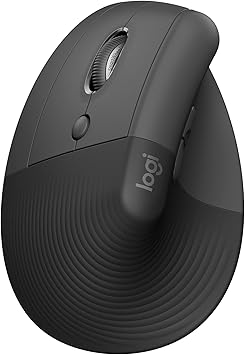
Logitech Lift Left Vertical Ergonomic Mouse
Wrong for you if you mouse with your right hand, because this is the mirror-image version and it will not work in the right.
$74.85
Price checked Sep 27, 2026
Logitech Lift Left Vertical Ergonomic Wireless Mouse, Graphite
The Lift shape built for the left hand, which is rare in this category. It carries the same 57 degree angle, single AA battery and three-device pairing as the right-handed Lift, and the same small to medium sizing. OSHA's own tip list suggests alternating hands, and a left-hand mouse is how that becomes practical.
We may earn a commission on this link. It never changes the ranking.
- Angle
- 57 degrees
- Handedness
- Left
- Hand size
- Small to medium, per Logitech
- Weight
- 125 g
- Battery
- 1 AA, rated 24 months
- Connection
- Bluetooth or Logi Bolt, up to 3 devices
What works
- One of very few vertical mice made for the left hand
- Same specification as the right-handed Lift
- Makes OSHA's alternate-hands tip realistic
- Below Logitech's $79.99 list price
What to know
- Left hand only
- Small to medium sizing, so large hands are out
- Costs more on Amazon than the right-handed Lift
- Logi Bolt only, no Unifying support
| Mouse | Hand | Hand size | Weight | Power | Price |
|---|---|---|---|---|---|
| Logitech Lift | Right | Small to medium | 125 g | 1 AA | $64.79 |
| Logitech MX Vertical | Right | Medium to large | 135 g | Rechargeable | $77.99 |
| Anker Vertical | Right | Not published | 3.4 oz | 2 AAA | $29.99 |
| Logitech Lift Left | Left | Small to medium | 125 g | 1 AA | $74.85 |
Which one
Small or average hands: the Logitech Lift.
Large hands, or several computers: the MX Vertical.
Not sure the grip will suit you: the Anker.
Left-handed: the Lift Left, which is close to the only serious option.
What a vertical mouse will not fix
In the Conlon trial, the intervention that significantly reduced arm discomfort over a year was support under the forearm, not the mouse. If your chair has armrests, setting them so they carry the forearm without lifting the shoulder is the free version of that finding.
A mouse also cannot fix a desk that is too high. If your elbows sit below the work surface, your wrist will extend upward whatever the mouse looks like, and a keyboard tray that lowers both devices together addresses the height itself. The whole sequence, desk height first, then screen, then hands, is laid out in the ergonomic desk setup guide.
And a wrist rest is a separate question with separate evidence, much of it less encouraging than the product listings suggest.
Questions people actually ask
Does a vertical mouse help wrist pain?
It reduces forearm rotation and wrist extensor activity, which is the mechanism most often blamed for mouse-related forearm ache. The only year-long trial found a favourable but non-significant effect on new arm disorders. It is a reasonable thing to try for forearm and wrist discomfort, not a treatment for a diagnosed condition.
Does a vertical mouse help carpal tunnel syndrome?
There is no good evidence that it does. In the 2009 nerve conduction follow-up of the engineers trial, the alternative mouse had a protective effect on the ulnar nerve and no significant effect on the median nerve, which is the nerve compressed in carpal tunnel syndrome.
How long does it take to get used to a vertical mouse?
Expect to be slower at first. The 2013 study measured time to target rising from 3.4 to 4.2 seconds on a first comparison, and the authors said users needed training and familiarisation. Giving it two weeks before judging is sensible.
Will a vertical mouse fix shoulder pain on one side?
Usually not. One-sided shoulder ache at a desk tends to come from reaching for a mouse placed too far out, and the fix is moving the mouse next to the keyboard, whatever its shape.
Sources
- Quemelo PR, Vieira ER. Biomechanics and performance when using a standard and a vertical computer mouse. Ergonomics, 2013, 56(8), 1336-1344, for the pronation, deviation, muscle activity, time-to-target and satisfaction results.
- Conlon CF, Krause N, Rempel DM. A randomised controlled trial evaluating an alternative mouse and forearm support on upper body discomfort and musculoskeletal disorders among engineers. Occupational and Environmental Medicine, 2008, 65(5), 311-318, for the 206-engineer trial design, the hazard ratio for the alternative mouse and the forearm support result.
- Conlon CF, Krause N, Rempel DM. A randomized controlled trial evaluating an alternative mouse or forearm support on change in median and ulnar nerve motor latency at the wrist. American Journal of Industrial Medicine, 2009, 52(4), 304-310, for the ulnar and median nerve findings.
- OSHA Computer Workstations eTool, Pointer/Mouse, for the placement and size guidance and the alternate-hands tip.
- Logitech Lift Vertical Ergonomic Mouse, for the 57 degree angle, hand sizing, left-hand option and list price.
- Logitech Lift for Business data sheet, for the Lift's dimensions, weight, battery, sensor and connection specifications.
- Logitech MX Vertical Advanced Ergonomic Mouse data sheet, for the MX Vertical's dimensions, weight, battery, connections and the 10 percent strain claim with its footnote.
- Logitech MX Vertical Ergonomic Mouse, for hand sizing and list price.
- Anker 2.4G Wireless Vertical Ergonomic Optical Mouse, for the DPI settings, dimensions, weight, battery type, sleep behaviour and price.
As an Amazon Associate we earn from qualifying purchases. We earn a commission on some links, at no extra cost to you. It never changes which products we recommend or how they score. Full disclosure

Who wrote this
Editor, hardware and workstation geometry
Ellis Warner edits A Better Posture and writes the hardware side of it: desks, chairs, monitor arms and the measurements that decide whether any of them help. He reads the specification sheet, the warranty and the returns policy in full before he reads a single review, because that is where the differences between two apparently identical products actually live.
More from EllisThe standard
How this guide was built
- Manufacturer specification sheets and warranty terms, read in full rather than summarised from a listing.
- Published clinical trials and standards bodies where they exist, cited by name and linked.
- Owner reports at volume, including the one-star reviews, which is where failure modes live.
- Every price checked against the live listing on the date printed beside it.